
WARNING: somewhat geeky post follows…
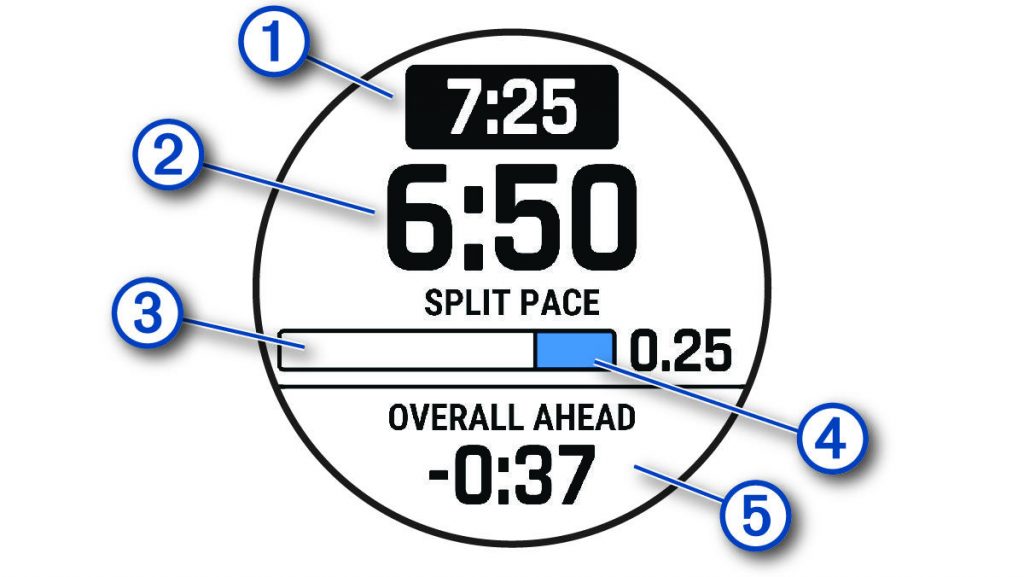
I’ve found the Garmin PacePro system very helpful on many runs. A run is divided into a number of segments, and the watch displays the (1) target pace for that segment, (2) the current pace achieved, (3) and (4) an indication of how much of the segment has been run, and of particular value (5) across the run as a whole, by how much I am ahead or behind target**.
** A small complaint: I hate the minus sign here. If I’m ahead by a negative amount, I’m behind, surely? But not in Garmin world. Minus means ahead, apparently. We just need to remember to read the word “ahead” and ignore the misleading minus sign. (If I’m behind target, “ahead” is replaced by “behind” but the minus sign disappears.)
Crucially, it knows the route too, so if the GPS position has a wander, perhaps due to weak signal in trees or among buildings, or because it cuts the corners on the switchbacks of a steep ascent, and the distance thus recorded by it doesn’t exactly match the expected distance, it compensates in terms of the ahead/behind calculation – the actual pace achieved might look odd, occasionally [it’s not a pace being run by me on the ground, but rather “in practice rate of progress over the plotted route”], but in terms of “am I on track” it isn’t misled by GPS anomalies, though if the actual route on the ground varies from that plotted (such as exact positions of any turn-around points), it does throw up some odd results. Essentially, though the information isn’t presented like this: it’s saying “you should be at point X by this time, and point Y by this time, and point Z by this time” and the rest of the information flows from there, but in a way which is generally more useful as guidance while running.
The automated calculations it makes in advance (as to what paces to target) are generally fine, and the splits for the segments can be based either on distance (i.e. what pace for this kilometre/mile) or elevation, where Garmin divides the route into sections of varying length based on changes in gradient and adjusts the required paces accordingly to produce the desired overall finish time/pace. I’ve used it mainly in races, but occasionally on hillier ordinary runs where I’m still aiming at an overall pace but want to flex in a controlled way to fit around hills.
I commented in my blog entry on pacing that I’d like to get Garmin PacePro involved for the Jungfrau Marathon, but that a key problem was that its automated calculations did not look realistic – primarily it wasn’t making enough distinction between the flat and the semi-vertical sections even at the extreme end of its scale to make hills relatively easier than the flat.
I had three further concerns: first that its “elevation based splits” (that is, where it made the divisions) seemed to be in some odd places; second that while the overall length was a marathon-plausible 42.35 km, the PacePro lengths added up to nearly 44km, which was a huge difference; and third was an elevation glitch in the data for the Lauterbrunnen valley heading back north, which had me running over a non-existent hillock in the valley bottom on a section which is close to pancake flat, and thus interfering with the pace calculations.
Together, the four things meant that I put PacePro to one side for a while.
When I returned to it, I explored getting the PacePro .FIT file from the watch (it doesn’t seem to be available via the Garmin website or app) and perhaps editing it – I didn’t succeed. I also looked at third-party tools to take a .GPX or .FIT file and add pacing information to them based on my own judgements as to split locations and paces, but no success there either.
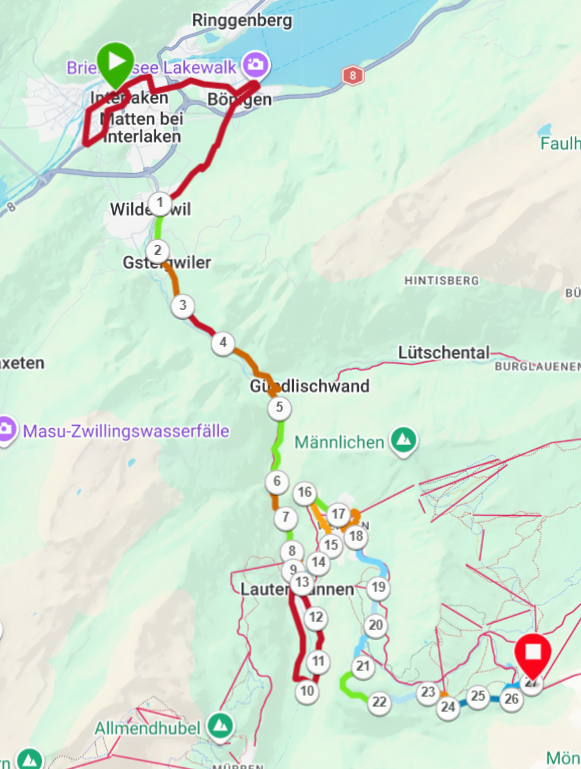
In the end I went back to the source. The .GPX file I’d used for the route, from the Jungfrau Marathon’s own website, had nearly 9000 trackpoints, which is rather a lot, even for a twisty route. I simplified the .GPX file to 2000 points, imported it afresh into Garmin Connect, created an initial PacePro strategy based on elevation changes, and lo and behold! it now was 42.17km long, split into 27 segments totalling 42.14km, effectively the same, with the segment splits being at sensible positions reflecting the topology of the route – save for the false hill in the valley bottom.
I copied the data for the segments out from Garmin Connect into Excel, flattened the false hill, and used my previous approach of a calculated pace based on net elevation gain in the segment (I’ve ignored any net descent), adjusted with a cumulative tiredness factor, and my own “terrain factor” for each segment. I then manually edited the paces in Garmin Connect to reflect my calculations in Excel.
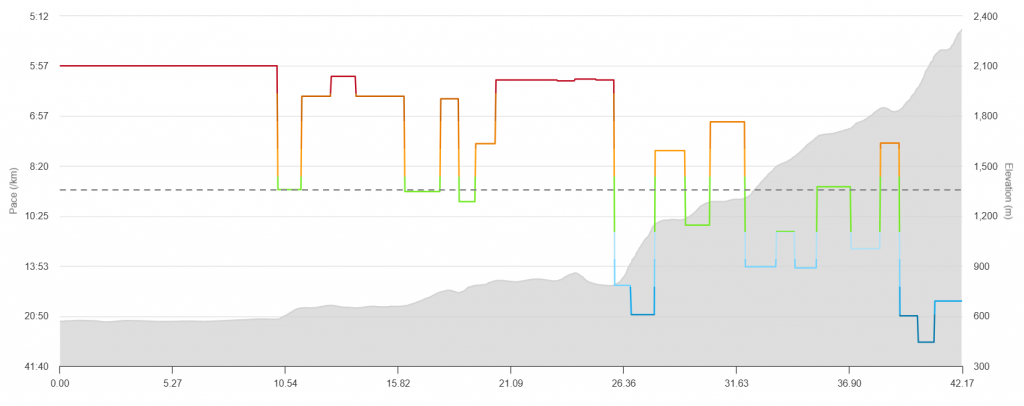
This produces 27 segments, and v1 of my PacePro plan has paces from 5:57/km for the flat 10.19km to Wilderswil, down to 28:12/km for a very steep 790m segment near the top. The Wall from Lauterbrunnen is now two segments at 15:57 and 20:32/km, to produce a 6:28:47 overall finish time.
The precise numbers are not important for the moment: I can refine them in a few months when I’ve got more confidence about my abilities and how effort across the day should be apportioned, but I’m pleased I’ve now got a mechanism which will give me sensible data to put into Garmin and thus onto my watch which can provide me with some guiding information on the day.
Leave a Reply